Let's get the awkward question out of the way first:
How much does AI automation actually cost?
If you've looked around online, you've probably noticed something strange.
One company says it can build an automation for £500.
Another says £5,000.
Another says £20,000.
And someone else tells you that an AI agent can cost £100,000+.
So who's right?
Honestly, all of them can be.
They're probably just selling different things.
A simple workflow that connects a website form to a CRM is not the same project as an AI agent that talks to customers, checks your database, updates your ERP, sends WhatsApp messages, handles exceptions and keeps an audit trail.
Calling both of those “AI automation” is where the confusion starts.
So here's a more useful way to look at it.
The quick answer
There is no single “AI automation price”.
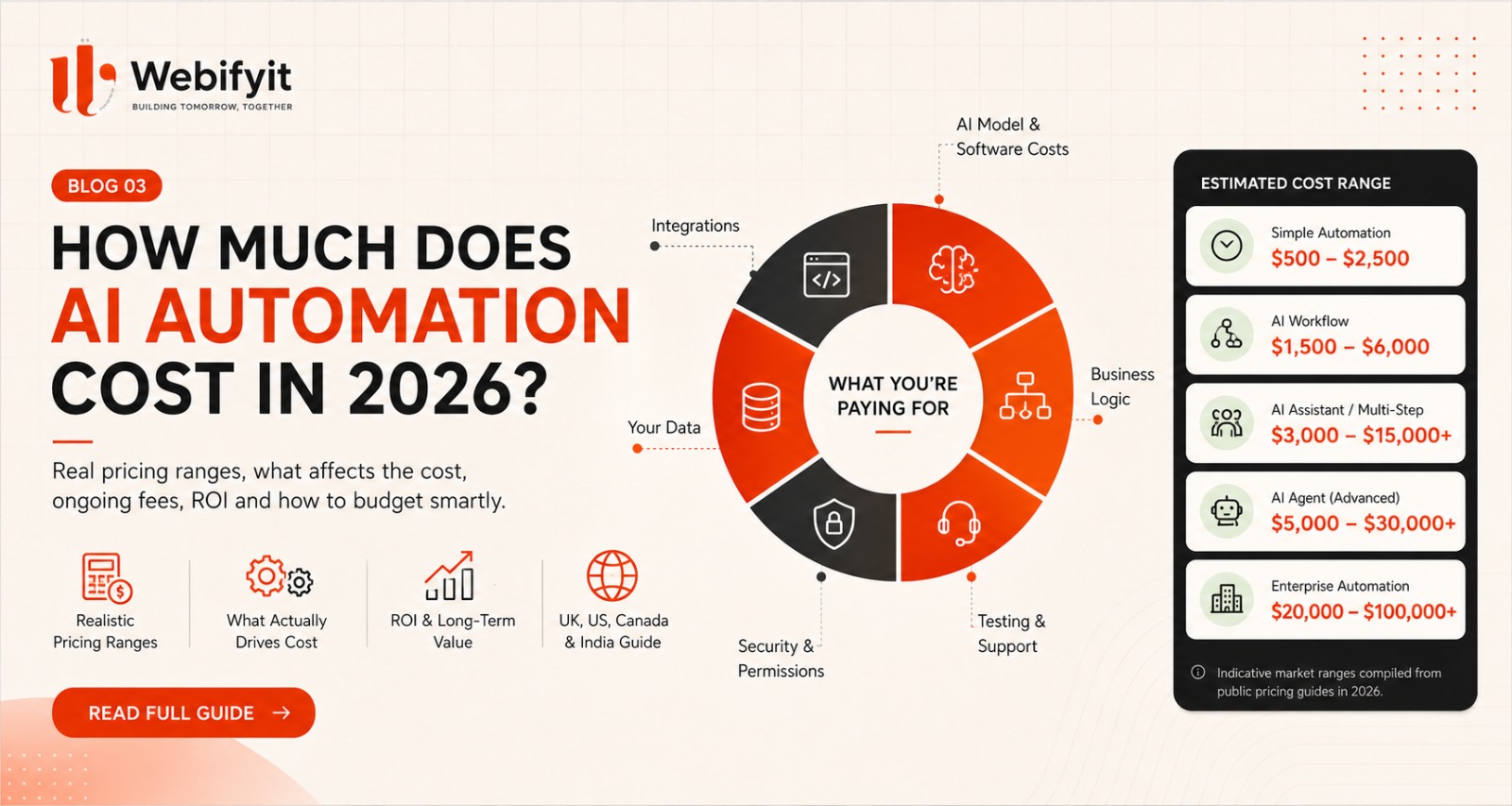
As a practical 2026 planning guide, you can think roughly like this:
| Project type | Typical starting range |
|---|---|
| Simple automation / single workflow | $500–$2,500 |
| AI-assisted workflow with a few integrations | $1,500–$6,000 |
| Multi-step automation / AI assistant | $3,000–$15,000+ |
| Custom AI agent with multiple integrations | $5,000–$30,000+ |
| Larger business-wide automation programme | $20,000–$100,000+ |
These are planning ranges, not universal market prices. Actual quotes depend heavily on scope, existing software, data quality, integrations, security, testing and the level of support required.
Current UK pricing guides show similarly wide ranges: simple workflows often start in the low thousands of pounds, while connected production builds and more advanced agentic systems move substantially higher. Canadian guides also show large variation, from smaller packaged implementations to five-figure or higher engagements.
The number that matters isn't the biggest one.
It's:
What exactly are you automating?
Why can the price vary so much?
Because “AI automation” can mean almost anything.
Compare these two projects.
Project A
A website lead comes in.
AI reads it.
A CRM record is created.
The sales team gets a notification.
That's a relatively contained workflow.
Project B
A customer calls.
An AI voice agent answers.
It understands the customer's request.
Checks availability.
Reads account information.
Updates the CRM.
Creates an order.
Sends a WhatsApp confirmation.
Escalates unusual situations.
Logs the conversation.
And keeps working even when the first system it calls is unavailable.
Those two projects should not cost the same.
The difference isn't simply “more AI”.
It's more systems, more logic, more risk and more responsibility.
What are you actually paying for?
This is the part most pricing articles skip.
When you pay for AI automation, you are usually paying for several layers.
1. Discovery and workflow design
Before anything is built, somebody needs to understand:
How does the current process work?
Who does what?
Where does the data come from?
Which steps are manual?
Which decisions require a human?
Which systems are involved?
A good implementation can save money by discovering that you don't need to automate everything.
2. AI model and software costs
There may be costs for:
LLM/API usage
voice models
OCR
email services
automation platforms
databases
hosting
monitoring
These are usually recurring rather than one-time expenses.
And as AI systems become more complex, usage can increase quickly because agentic systems may make multiple model calls, use tools and process more context. Recent analysis around agentic AI costs has highlighted this difference between the cost of a single model call and the cost of an entire production workflow.
3. Integrations
This is often where the project becomes more expensive.
Your AI may need to connect to:
Salesforce
HubSpot
Zoho
Tally
SAP
Shopify
Google Workspace
Microsoft 365
Stripe
custom databases
internal APIs
One integration might be simple.
Another might require authentication, custom logic, error handling, testing and coordination with another system.
That difference matters.
4. Business logic
A business rarely wants:
“AI, do something.”
It wants:
“If this happens, check this, unless this condition is true, then ask a person, otherwise continue.”
That's business logic.
For example:
If a lead is worth more than £10,000, alert the sales manager.
If the AI confidence is low, escalate to a human.
If the order exceeds the available stock, don't confirm it.
The more rules and exceptions there are, the more engineering is required.
5. Your data
AI quality depends heavily on the information it can access.
If your company has:
clean CRM data
well-organized documents
structured product data
consistent customer records
implementation is easier.
If everything lives across:
Excel
old PDFs
emails
paper documents
and someone's laptop,
the project becomes partly a data-cleaning project.
That's one reason two businesses can request the same AI system and receive very different quotes.
6. Security and permissions
This becomes important as soon as AI can actually do things.
If an AI can:
read customer records
change orders
send messages
access invoices
modify CRM records
or trigger payments,
you need proper:
authentication
permissions
logging
access controls
and safeguards.
A demo can ignore many of these things.
A production system cannot.
7. Testing
What happens when:
the customer gives an incomplete answer?
the CRM is down?
the API times out?
the AI misunderstands the request?
the customer asks something outside the system?
the same request arrives twice?
the integration returns bad data?
Good automation isn't just about the “happy path”.
It's also about what happens when things go wrong.
8. Ongoing support
AI automation is not always:
Build once → forget forever.
You may need:
monitoring
prompt/workflow improvements
model changes
bug fixes
integration updates
usage monitoring
knowledge updates
security updates
new features
Some current UK pricing guides publish ongoing support in the hundreds to low thousands of pounds per month depending on scope, while Canadian guides also separate implementation from ongoing support.
So when comparing quotes, ask:
“What's included after launch?”
That's a much better question than simply:
“How much does it cost?”
UK AI automation pricing in 2026
The UK market currently has a broad range.
Public 2026 pricing guides show examples around:
Simple workflow
£500–£2,500+
Connected automation
£2,000–£8,000+
More advanced AI systems
£5,000–£15,000+
Larger production programmes
£15,000–£60,000+
Some specialist providers quote significantly more for complex multi-system deployments.
The important thing is that the scope behind the number matters more than the number itself.
For a UK business, a £2,000 automation and a £20,000 automation may both be completely reasonable if they solve very different problems.
US AI automation pricing
The US market can vary even more because there is a large difference between:
freelancers
specialist automation firms
AI consultancies
software development companies
enterprise consulting firms
A small, clearly defined automation can be a relatively small project.
A production system with several integrations, custom software and ongoing support can quickly move into the five-figure range.
The exact price should therefore be based on:
workflow complexity
rather than simply:
“It's an AI project, so it costs $X.”
For businesses buying from US providers, I would especially recommend asking for the quote to be broken into:
discovery
implementation
third-party services
ongoing support
That makes comparisons much easier.
Canadian AI automation pricing
Canadian pricing has a similarly broad spread.
Current 2026 Canadian pricing guides show everything from smaller packaged automations to $10,000–$25,000+ consulting/implementation engagements and significantly higher custom AI projects. Custom AI-agent guides can reach into the tens of thousands depending on integrations and complexity.
Again, don't compare two quotes until you understand what each supplier is actually delivering.
Indian AI automation pricing
India is very different.
You can find simple automation projects for:
₹25,000–₹75,000
and more involved implementations around:
₹1 lakh–₹5 lakh+
while complex custom platforms can go significantly higher.
But there is an important trap.
Two companies may quote:
₹50,000
for “AI automation”.
One might be providing a simple Make/n8n workflow.
The other might be providing a custom system with APIs, dashboard, authentication, logging and ongoing support.
The price is similar.
The product is not.
That's why deliverables matter more than the headline price.
Here's the better way to compare AI quotes
Don't ask:
“Who is cheapest?”
Ask:
What exactly is automated?
How many systems are connected?
What happens when something fails?
Who owns the code?
Who pays for the AI/API accounts?
Is hosting included?
Is testing included?
Is documentation included?
What happens after launch?
Is support included?
How are future changes priced?
A cheap automation with no support can become expensive very quickly.
What should a small business spend first?
This is where I usually recommend being conservative.
Don't start with:
“Let's build an AI platform.”
Start with:
“Let's automate one expensive workflow.”
For example:
Lead follow-up
Website → AI → CRM → WhatsApp → salesperson
or:
Customer support
Question → AI → knowledge → answer → human escalation
or:
Document processing
PDF → AI extraction → validation → database
or:
Appointment booking
Voice/chat → availability → booking → confirmation
If the first workflow works, expand.
A simple AI automation budget ladder
Under £1,000 / $1,500
Usually:
small workflow
limited integrations
simple implementation
£1,000–£5,000 / $1,500–$7,500
Usually:
one meaningful business process
several integrations
AI component
testing
basic support
£5,000–£15,000 / $7,500–$25,000
Usually:
multiple workflows
custom logic
AI agent/assistant
several integrations
production deployment
monitoring
£15,000+
Usually:
larger operational system
multiple departments
custom software
complex integrations
security
advanced automation
ongoing optimisation
Again, these are budgeting bands, not universal tariffs.
How do you know if AI automation is worth it?
This is more important than the build cost.
Let's say your team spends:
20 hours/week
on repetitive work.
Suppose that loaded labour cost is:
$30/hour
That's:
$600/week
or roughly:
$31,000/year
If a system costs:
$8,000
and genuinely removes most of that repetitive work, the economics can look very different from an $8,000 software expense.
But don't assume the whole saving becomes profit.
You need to account for:
AI/API usage
support
implementation
training
exceptions
human review
ongoing changes
And sometimes the real benefit is not headcount reduction.
It might be:
faster response
more sales
fewer mistakes
more capacity
better customer experience
That can be even more valuable.
A simple ROI formula
You don't need a complicated financial model to get a first estimate.
A simple way to look at an automation project is:
Net Annual Value = Annual Value Created − Annual Running Cost
Then:
Payback Period (months) = (Initial Implementation Cost ÷ Net Annual Value) × 12
Example
Let's say an automation system is expected to create $30,000 of value per year through time saved, faster follow-up and fewer missed opportunities.
The system costs:
- $8,000 to build
- $6,000 per year to run, including AI usage, hosting and support
First:
$30,000 − $6,000 = $24,000 net annual value
Then:
($8,000 ÷ $24,000) × 12 = 4 months
So, under these assumptions, the initial implementation cost could be recovered in about 4 months.
This is a simplified estimate, not a guarantee. Actual ROI will depend on how much value the automation creates, ongoing costs, adoption, maintenance and how consistently the system is used.
But don't force ROI where it doesn't exist
There are projects where the value isn't easy to quantify.
For example:
an internal knowledge assistant
better customer experience
faster proposal preparation
improved employee onboarding
better reporting
These can still be worth doing.
Just don't invent a fake ROI number.
The hidden cost: maintenance
This gets ignored constantly.
Imagine you build an AI assistant today.
Six months later:
the CRM changes
the API changes
the website changes
the business adds new products
the knowledge base changes
the model changes
customer questions change
Now the original system needs updates.
That's normal.
It doesn't mean the project failed.
It means the system is part of a living business.
A proper budget should account for that.
Do you need an AI agent?
Maybe not.
This is one of the easiest ways to overspend.
If the workflow is:
Lead arrives → send acknowledgement → create CRM record
you may not need a sophisticated agent.
A normal automation may be enough.
But if the workflow is:
Understand request → ask missing questions → search information → make a decision → take actions → escalate exceptions
then an agentic approach may make sense.
The right architecture depends on the job.
Don't choose the most expensive AI model by default
This is another common mistake.
A stronger model isn't automatically better for every step.
A production workflow might use:
simple automation
for predictable tasks,
a smaller/cheaper model
for classification,
a stronger model
for difficult reasoning,
and a human
for high-risk decisions.
This kind of architecture can reduce operating cost while keeping quality high.
Recent reporting on the “inference paradox” highlights that more sophisticated agentic workflows can increase total AI costs even as individual model calls become cheaper.
What should you build first?
If you're a small or medium-sized business, I'd usually start with one of these:
Sales
Lead qualification + follow-up
Support
FAQ + triage + escalation
Operations
Data entry + workflow automation
Finance
Document/invoice processing
Recruitment
Screening + scheduling
Customer experience
Booking + reminders + follow-up
The best candidate is the one with:
high volume
repetitive work
clear business impact
good-quality data
A simple buying framework
Before spending money on AI automation, ask:
1. What problem are we solving?
Write it in one sentence.
2. How does the process work today?
Map every step.
3. How often does it happen?
Weekly? Daily? Thousands of times?
4. How much time does it consume?
Track it.
5. What systems are involved?
CRM? ERP? Email? WhatsApp? Database?
6. What should AI actually do?
Be specific.
7. What should a human still approve?
Define the boundary.
8. How will we measure success?
Choose 2–5 metrics.
9. What happens if the system fails?
Plan for it.
10. What happens after launch?
Budget for support.
The biggest mistake is buying AI before fixing the workflow
This is worth repeating.
If your process is broken:
AI will not magically fix it.
You can build a beautifully automated version of a terrible process.
And now the terrible process happens faster.
Start with:
Map
→ Simplify
→ Automate
→ Measure
→ Improve
That's the approach I prefer.
So what should your first AI project cost?
There is no universally correct number.
But a sensible first project for a small business is often:
One workflow. One measurable outcome. Limited integrations. Short delivery.
That's much safer than signing a large AI transformation contract before you've proved anything.
For example:
Pilot
Lead qualification + CRM + follow-up
rather than:
Big project
“AI-powered sales transformation platform.”
Start with something you can actually measure.
A note for UK, US and Canadian businesses
The most important thing is not to compare your local price directly to another country's price.
A UK agency, US consultancy, Canadian studio and Indian engineering team can all deliver technically similar work at very different commercial prices.
What matters is:
scope
quality
communication
ownership
security
delivery responsibility
support
business outcome
That is why a business should compare the solution, not simply the hourly rate.
What we believe at Webifyit
Our view is simple:
Don't sell AI because AI is popular.
Sell a measurable improvement to a real business process.
We'd rather automate one workflow properly than build ten impressive demos nobody uses.
Our approach is:
Understand the workflow
↓
Find the bottleneck
↓
Choose AI / automation / custom software
↓
Build the smallest useful version
↓
Connect it to the existing systems
↓
Test it
↓
Measure the result
↓
Expand when it works
That makes AI much easier to justify.
Final takeaway
There is no universal price for AI automation in 2026.
A useful first workflow might be a few hundred or a few thousand.
A production-grade AI system with multiple integrations can move into the five-figure range.
Large business-wide programmes can go much higher.
But the price of the AI model is only part of the picture.
The real cost usually comes from:
the workflow
integrations
data
business logic
security
testing
deployment
support
So before asking:
“How much does AI automation cost?”
ask:
“What exactly are we trying to automate, and what is that process worth to the business?”
That's the question that leads to a useful budget.
Need help estimating your own AI automation project?
Webifyit helps businesses map existing workflows, identify practical automation opportunities and build AI systems that connect to the software they already use.
Request an AI Automation Assessment →
Sources used for the 2026 pricing ranges
- UK AI automation pricing guides from APIwise, ICE WIND, LoopStack, AxiomAI and Sharp Code.
- Canadian 2026 pricing guides from Atlas Atlantic, DeployLabs and WebLaunch.
- Current reporting on the economics of agentic AI and AI inference costs.